
+LIVE · NOT A SIMULATION
Real thermal vision on your Meta Quest 3
Plug a FLIR One USB-C camera into your Quest 3 or 3S and see live heat on the real world — a genuine radiometric sensor overlaid on passthrough. Watch pipes, breakers, drafts, and 3D printers glow in place.
Quest 3 & Quest 3S · FLIR One Gen 3 / Pro LT / Pro (USB-C) · Meta Horizon Store — coming soon
+WHAT IT DOES
Thermal imaging that lives in your room
Phone thermal cameras show you a tiny screen. ThermaSpace puts the heat where it actually is — on your walls, your equipment, your house — and remembers it between sessions.
Captures snap to the real surface you're looking at, sized to the camera's true field of view — and they persist. Walk away, come back tomorrow, the survey is still on the wall.
Recall any set of captures from the gallery and they're re-colored onto one shared temperature scale — identical colors mean identical temperatures, room to room.
Circle the cold corner, mark the leak. Free-space drawings anchor in your room and reload across sessions, with a grab handle to reposition them.
Iron, rainbow, and grayscale palettes; isotherm alarms for the hottest or coldest zones; and a lockable °C/°F color scale for surveys you can actually compare.
🔒 Live lock
Lock any placed capture and it becomes a live instrument — every time you glance at it, it refreshes to what the camera sees right now. A thermal gauge for your breaker panel or printer bed.
📡 Export over your Wi-Fi
One ZIP with color PNGs, raw radiometric data, and context photos — served straight from the headset to your browser. Off by default, protected by a session code.
🛡 Nothing leaves the headset
No account, no cloud, no telemetry. Every capture and temperature history stays in private storage on your Quest. Read the whole privacy policy — it fits in a paragraph.
+SETUP
Working in about a minute
-
Plug in the FLIR One
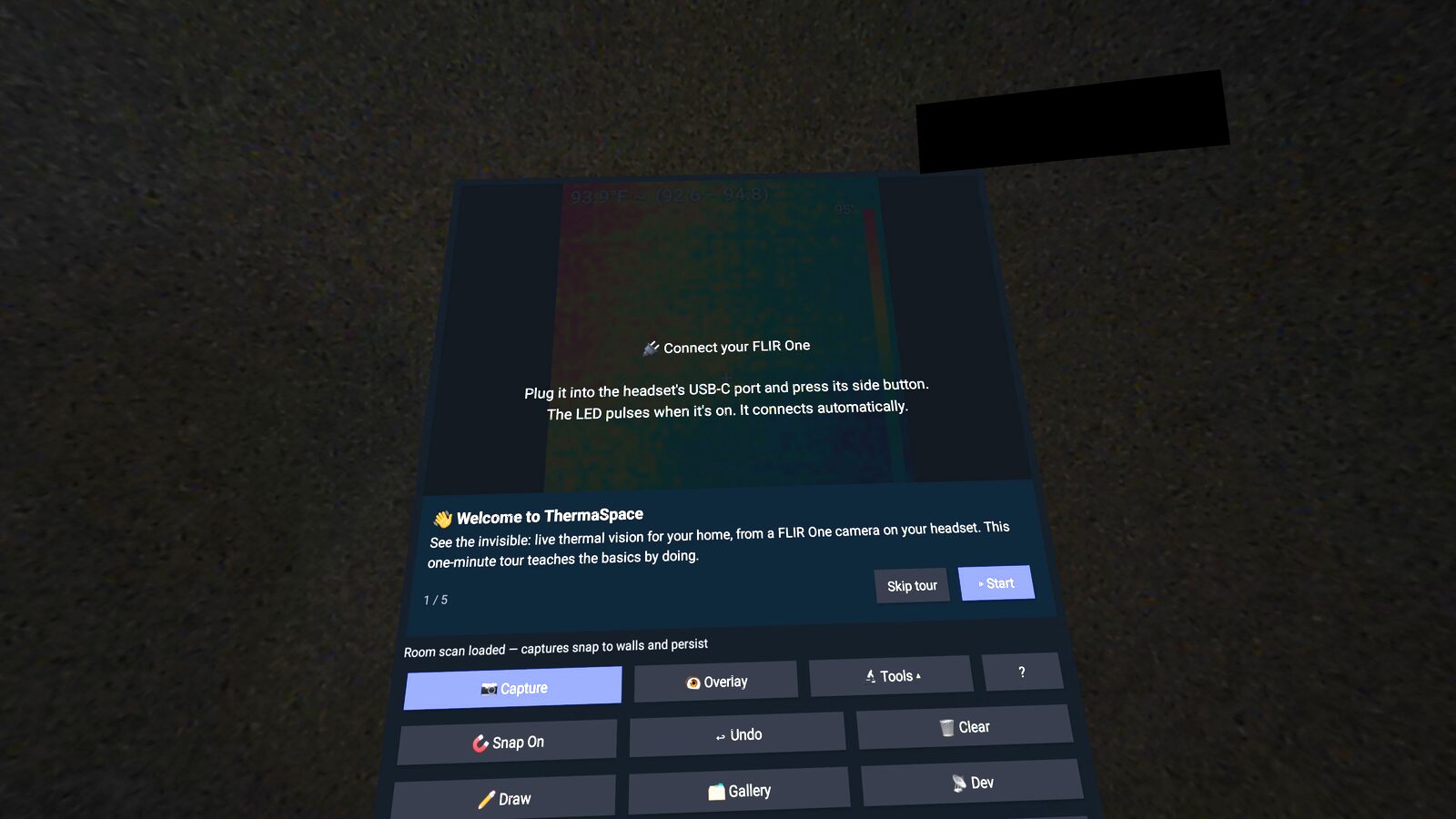
The same USB-C camera you use with your phone goes straight into the Quest's USB-C port. Press its side button — the LED pulses when it's on.
-
Seat it in the mount
The 3D-printed holder sits the camera above your visor, aimed where you look. No mount yet? Hand-holding the camera works fine for a first try.
-
Look around
ThermaSpace connects automatically and a one-minute tour teaches the basics by doing: overlay on, first capture, gallery. Controllers and bare hands both work.
+HARDWARE
A FLIR One mount for Quest 3 & Quest 3S
Printed in PETG, designed around the Quest 3's depth sensors so nothing is blocked. A clip that bridges the top shell, with a thumbscrew knuckle to aim the camera.
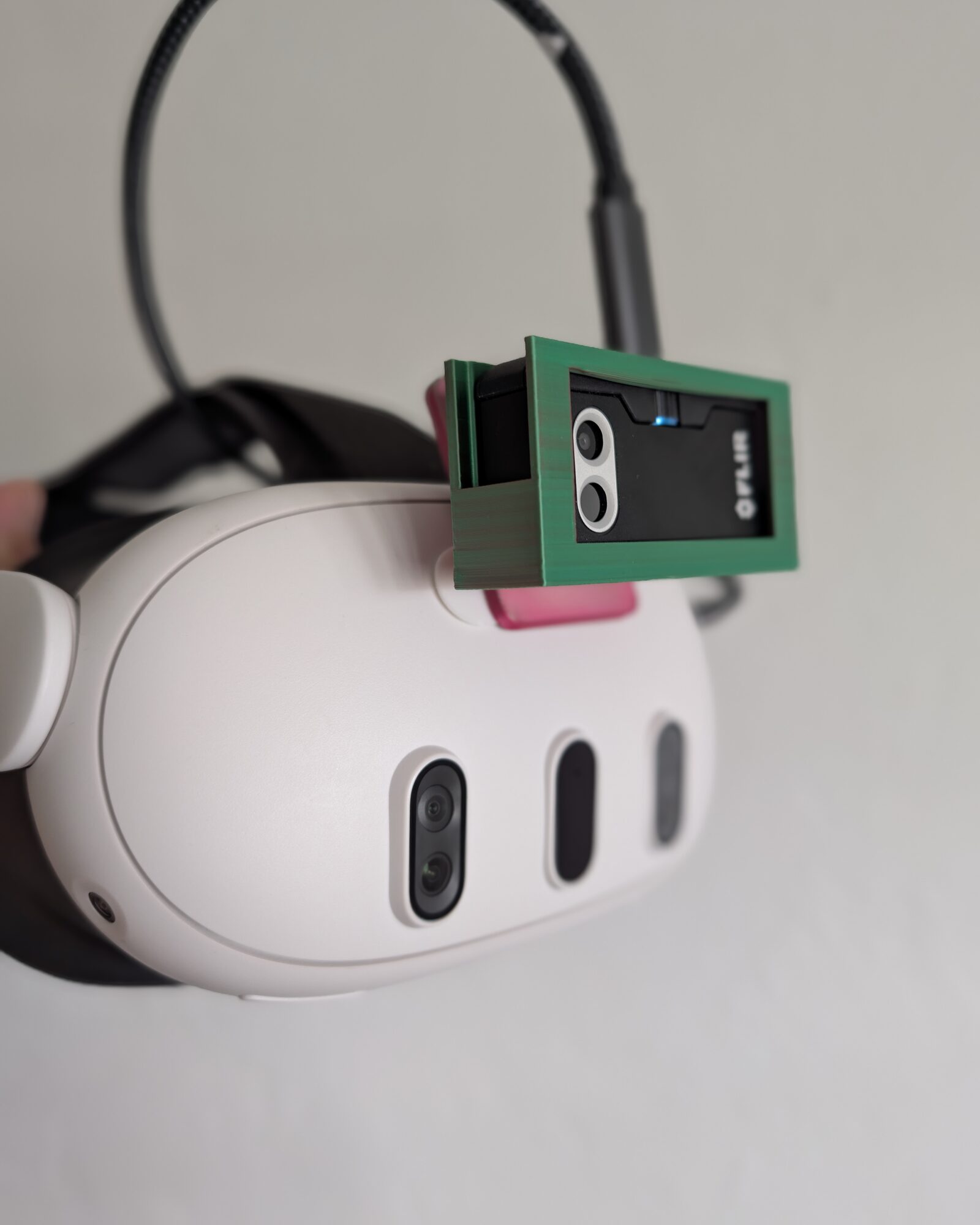
- Clip — bridges the headset's top shell with a sprung rear lip. Quest 3 and 3S sizings.
- Aim it — an M5 or M6 nylon thumbscrew knuckle tilts the camera to match your view.
A small Command picture-hanging strip seats the clip on the visor — holds firm, peels off clean, leaves no mark on the headset.
Every order funds Opportunity Hack education programs.
Or print it yourself — the files are free
Open-source STLs, ~15 g of PETG. M5 or M6 nylon thumbscrew closes the knuckle.
+WHY THIS EXISTS
Built to spark curiosity
ThermaSpace is a project of Opportunity Hack, a nonprofit hackathon community that writes code for good. It exists to further education and get people curious about what's around them — the heat you can suddenly see, and the code that makes it visible.
And it's fully open source — the Quest app, the Python driver, the reverse-engineered USB protocol notes, even the 3D-printable mount and this website. Every layer is open to pull apart: calibrating a radiometric sensor, mapping a room in 3D, anchoring content to real walls.
Want to help? We welcome contributors of every experience level — code, docs, mount designs, or field testing. Open an issue, send a pull request, or just star the repo and follow along.
+QUESTIONS
FAQ
Which FLIR One cameras work?
Any FLIR One with a USB-C connector: FLIR One Gen 3, FLIR One Pro LT, and FLIR One Pro. The Lightning (iOS) models don't fit the Quest's USB-C port and aren't supported.
Which headsets are supported?
Meta Quest 3 and Quest 3S. ThermaSpace relies on color passthrough and the USB-C port, so earlier Quests aren't supported.
Is this real thermal imaging or an effect?
Real. ThermaSpace streams the FLIR One's radiometric sensor over USB — every pixel is a real temperature in °C or °F, with a spot meter and min/max span readout. The "thermal vision" apps already on the store are simulations; this one requires the physical camera.
Do I need a PC or a phone?
No. The camera plugs straight into the headset and everything runs on the Quest. A browser on the same Wi-Fi can optionally view the live stream and download your captures.
Does it collect my data?
No. Nothing is collected or transmitted off the device — no account, no analytics sent anywhere. See the privacy policy.
Where do I get the app?
It's headed to the Meta Horizon Store. Until then, fill out the signup form to join the beta — you'll get a build and sideload instructions.
Can I use the FLIR One I already own?
Yes — that's the point. If it has USB-C, unplug it from your phone and plug it into your Quest. Nothing is modified; it keeps working with your phone afterward.
Is ThermaSpace open source?
Yes — the whole project is open source on GitHub: the Quest app, the Python FLIR One driver, the USB protocol documentation, the 3D-printable mount files, and this website. Contributions are welcome — open an issue or send a pull request.